Automated Video Editor: Transform Your Videos with AI
Discover how the automated video editor uses AI to streamline your workflow, delivering faster, higher-quality videos you can publish today.
An automated video editor is a smart piece of software that takes on the grunt work of video creation. Think of it as your own digital production assistant, one that uses artificial intelligence to handle all the repetitive, time-consuming tasks so you can focus on the creative side of things.
From Manual Labor to Intelligent Automation
If you’ve ever edited a video the old-fashioned way, you know it’s a bit like building custom furniture from scratch. Every single cut, every transition, and every color adjustment is a careful, manual step that demands a ton of time and skill.
An automated video editor completely flips that script. It’s more like a modern assembly line for your content. You just feed it the raw materials—your video clips, images, text, or even a script—and the system intelligently puts together a polished final product for you.
This whole approach is designed to smash through the biggest bottleneck in content creation today: the sheer amount of time and resources it takes to consistently pump out high-quality video. For a business, this can be the difference between struggling to release one video a week and effortlessly producing dozens.
The Core Problem Solved by Automation
At its heart, automated editing solves the problem of scalability. When you edit manually, making ten videos takes about ten times the effort of making one. It’s a purely linear process. Automation shatters that model.
Here’s where you’ll really feel the difference:
- Time Efficiency: Tasks that used to eat up hours, like chopping out dead air or adding subtitles, can now be done in minutes.
- Resource Management: You no longer need a big team of specialized editors, which makes video production way more affordable and accessible.
- Brand Consistency: Automation ensures every video sticks to your brand guidelines—logos, colors, fonts—without you having to double-check everything.
This frees you up to think about the big picture, like your strategy and storytelling, instead of getting lost in the weeds of technical edits. The market is definitely taking notice. The global AI-powered video editing software market started at USD 563 million and is expected to climb to USD 953 million by 2032. This boom is happening because businesses are jumping on automation to cut their post-production time and scale up their content. You can explore more on the rapid expansion of the AI editing software market to see just how fast it's growing.
An automated video editor doesn’t replace creativity; it amplifies it. By handling the 90% of editing that is repetitive, it frees up human talent to focus on the 10% that truly matters—the story, the message, and the creative vision.
When you look at the old way versus the new, the contrast is pretty stark.
Manual vs Automated Video Editing at a Glance
| Aspect | Manual Video Editing | Automated Video Editor | | :--- | :--- | :--- | | Workflow | Linear and time-intensive; one video at a time. | Parallel and scalable; handles multiple videos at once. | | Time Investment | Hours or days per video. | Minutes per video. | | Required Skills | Deep technical expertise in editing software (e.g., Premiere Pro). | Minimal technical skill; focus is on content and rules. | | Consistency | Relies on human editors to follow brand guidelines. | Enforces brand consistency automatically via templates. | | Scalability | Very difficult to scale without hiring more editors. | Easily scales from one video to thousands. | | Cost | High costs associated with skilled labor and software licenses. | Lower operational costs; often subscription-based. |
Ultimately, automated video editors are making video production accessible to everyone. Small businesses can now go toe-to-toe with big corporations, and individual creators can keep a steady stream of content flowing without burning out. This technology isn't just about making videos faster; it's about changing the entire game of how we create and share stories visually.
What's Really Going On Inside an Automated Video Editor?
So, how does an automated video editor actually work? It’s not just some black box. To really get a feel for what these tools can do, you have to look at the AI working behind the scenes. Think of it less as a single piece of software and more like a digital production crew, where each AI has a specific job that mimics what a human team would do.
At the heart of it all are two core AI technologies working together: Computer Vision and Natural Language Processing (NLP). They’re the director and the script supervisor of your automated crew. Understanding how they team up is the key to seeing how raw footage gets turned into polished video without you lifting a finger.
The AI Camera Operator: Computer Vision
Imagine you have an AI that can watch your footage just like a seasoned editor. That's Computer Vision. It’s not just seeing pixels; it’s analyzing and understanding the visual information in every single frame. When you dump a folder of clips into the editor, this is the AI that sifts through it all to find the good stuff.
This is what it handles for you:
- Smart Trimming: It spots the best moments of action in a clip and automatically cuts the boring parts—the shaky camera movements, the awkward pauses, the dead air.
- Scene Detection: Instead of you manually scrubbing through a 20-minute clip to find transitions, the AI breaks it all down into logical scenes. This makes rearranging your story or pulling out a quick highlight reel incredibly easy.
- Object Recognition: This is a huge one for e-commerce. The AI can actually identify specific products in your videos, which opens the door for automatically adding B-roll or even clickable product overlays.
In short, Computer Vision takes care of the visual storytelling, making sure the final cut is tight, engaging, and focused on what your audience actually wants to see.
The AI Script Supervisor: Natural Language Processing
While Computer Vision is busy with the visuals, Natural Language Processing (NLP) is your audio engineer and script supervisor. This is the part of the AI that understands human language, whether it’s written text or spoken words. It’s what connects your script or core message to the actual video.
Here are its main gigs:
- Text-to-Video Generation: You can give the AI a blog post, a script, or even just a few bullet points. It analyzes the text and then builds a video to match, pulling in relevant stock clips and adding text on screen.
- Automated Captions: NLP listens to the audio in your video and transcribes it with stunning accuracy. It generates perfectly timed captions, a job that used to be a mind-numbing, time-sucking task.
- Voiceover Creation: The more advanced tools use NLP to create surprisingly realistic text-to-speech voiceovers. You can pick different voices and languages without ever needing a microphone.
When you put these two AIs together, you get a system that transforms video production from a hands-on, technical chore into a simple, automated workflow.
The whole process really boils down to three simple steps.
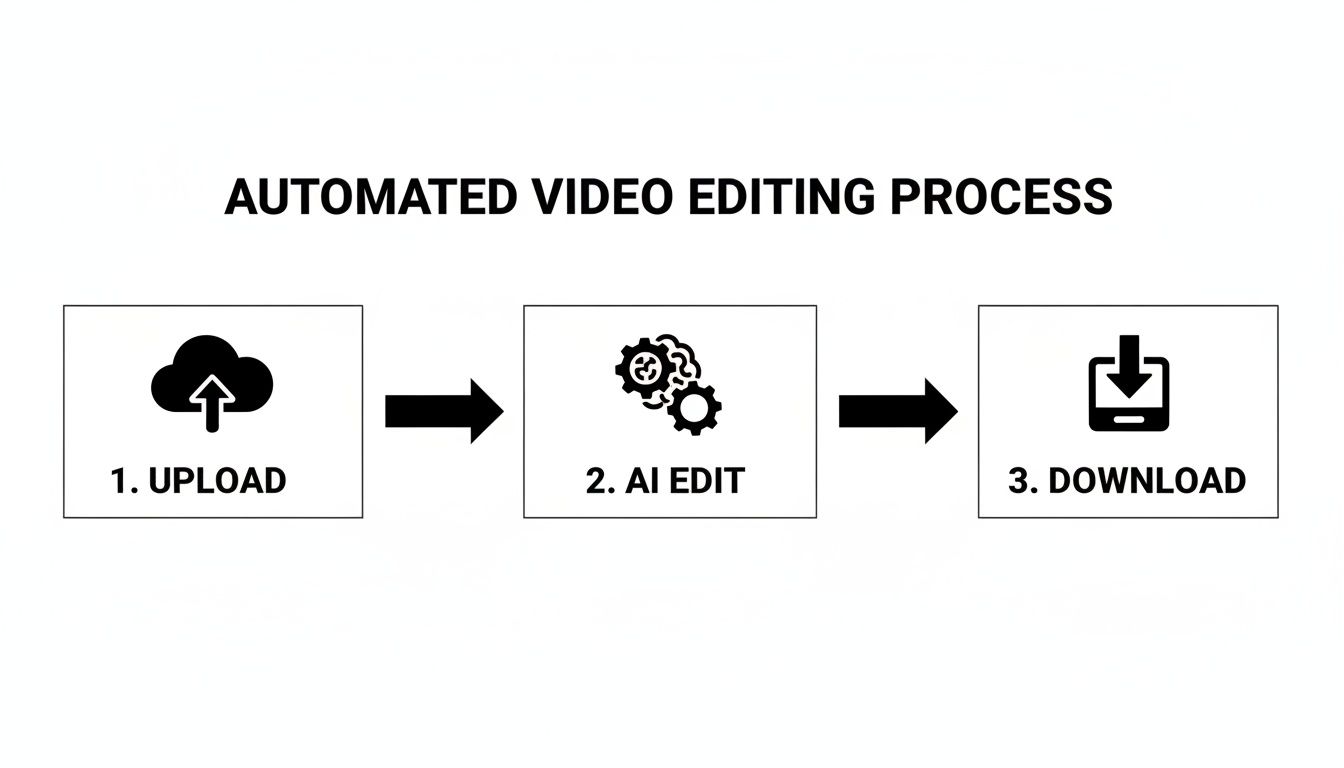
As you can see, your job is just to provide the raw materials. The AI does all the heavy lifting in the middle, and you get the finished product.
The real power here isn't just one cool feature. It's how these different AI systems work together. The tool makes decisions based on both what it sees and what it hears, leading to a final video that’s far more cohesive and professional.
This integrated approach completely changes the speed of content creation. Things that used to require expensive software and a lot of training are now available to pretty much anyone. To learn more about how these platforms can boost your output, it's worth checking out some in-depth guides on AI video editing software.
For any business, this means you can finally test more ad creatives, create content for different global markets, and stick to a consistent publishing schedule—all without your production budget spiraling out of control. It’s all about getting more done, faster and smarter.
What to Look for in a Great Automated Video Editor
When you start digging into automated video editors, you’ll see that they are far from being created equal. While pretty much all of them promise to save you time, the truly game-changing tools are packed with intelligent features that do more than just basic, repetitive tasks. Knowing what to look for is the key to picking a platform that actually fits your creative workflow.
Think of it like shopping for a new car. Any car will get you from point A to B. But a top-of-the-line model with adaptive cruise control and smart parking doesn't just get you there faster—it fundamentally changes the entire driving experience. The same goes for video editors. The right features can take your workflow from simply "faster" to genuinely effortless and scalable.
So, let's break down what really separates the good from the great.
From Text to Video in Minutes
One of the most powerful features you'll find is text-to-video generation. This is where you can feed the platform a blog post URL, upload a script, or even just jot down a few bullet points, and the AI builds an entire video from scratch. It reads your text, pulls relevant stock footage and images, and even generates a voiceover, effectively turning your written words into a compelling video.
This is an absolute game-changer for repurposing content. Imagine that library of blog posts you've built over the years. With this feature, it can become a never-ending source of social media clips, explainer videos, and ad creatives—all with very little manual work. The best tools will also let you guide the visual style and pacing, so the final video feels true to your brand.
The growth here is just explosive. Automated video editors are a huge part of the AI video market, which was already valued at USD 3.86 billion and is on track to hit USD 42.29 billion by 2033. This surge is all thanks to creative AI that automates everything from scriptwriting to scene creation.
Intelligent Scene and Clip Management
A top-tier automated editor doesn’t just blindly stitch clips together; it actually understands them. You'll want to look for tools that offer smart scene detection and auto-trimming. These features use computer vision to scan your raw footage and pinpoint the most interesting parts.
- Auto-Cutting Silences: The AI can find and snip out all the awkward pauses and dead air. This is a lifesaver for interviews, webinars, or any talking-head videos, making them feel tighter and more professional.
- Smart Trimming: Instead of you scrubbing through a 30-second clip to find the best 3 seconds, the AI identifies the peak action and does the trimming for you. This saves an unbelievable amount of time when you're dealing with a lot of footage.
For a great rundown of tools that excel at this, check out this list of the 12 Best Video Editing Automation Tools to see how different options compare.
Effortless Branding and Consistency
Keeping your brand looking consistent across dozens, or even hundreds, of videos is a massive headache. The best automated editors solve this with automated branding kits and template-driven workflows.
You just upload your brand assets one time—your logo, color palette, and custom fonts. From then on, the platform automatically applies them to every single video it creates. This means every piece of content, whether it’s a quick TikTok or a polished YouTube ad, instantly looks and feels like it’s yours.
The goal of a great automated editor is not just to produce a video, but to produce your video. Automated branding ensures that scalability never comes at the cost of brand identity.
This approach lets you create a whole library of custom video templates for different needs, like product demos, testimonials, or social media updates. When it's time to make a new video, you just pick a template, drop in the new content, and the AI does the rest. It guarantees a polished, on-brand result every single time, turning video creation from a constant project into a streamlined, scalable system.
Where Automated Video Editors Really Shine: Marketing and E-commerce Wins
It’s one thing to talk about the features of an automated video editor, but it’s another to see what it can actually do for a business. For marketing and e-commerce teams, these tools aren't just a neat piece of tech—they’re a serious engine for growth.
By taking the most time-consuming parts of video production off your plate, these platforms completely change the game. Suddenly, your team can test, learn, and roll out video campaigns at a speed that was once impossible.
And the impact is huge. AI video tools are slashing production costs while cranking up output. In fact, 63% of businesses report a 58% reduction in costs compared to doing things the old way. On top of that, brands can save up to 68% on talent-hiring expenses by using AI avatars, making large-scale video campaigns much more affordable. You can dig into more of these numbers in this Gudsho breakdown of video editing stats.
Let’s look at two areas where automated video editors are making a massive difference: e-commerce advertising and agency content production.
E-commerce Product Videos at Scale
If you run an e-commerce brand, you know that product videos are conversion gold. The problem? You constantly need new variations to keep your ads from going stale on TikTok, Instagram Reels, and YouTube Shorts. This is where an automated video editor becomes your secret weapon.
Imagine you just finished a product photoshoot. Normally, turning those images and clips into a handful of video ads would be a multi-day job. With automation, the workflow is completely different.
- Create Ad Variations in a Flash: Using a platform like ViewPrinter, you can set up one master template. From there, the system can automatically pump out dozens of unique videos by swapping in different product shots, text hooks, and calls-to-action.
- Make A/B Testing Effortless: This speed makes real A/B testing possible. You can finally figure out which opening hook grabs the most attention, which product feature gets more clicks, or which background track drives more sales—all without bogging down your creative team.
- Personalize and Localize Content: Need to target different regions? An automated editor can create localized ads by changing the currency, language, or even using models that connect with a specific local audience, all from the same set of assets.
This process transforms a static folder of product photos into a virtually endless stream of high-performing video ads. It lets brands stay fresh and constantly tune their campaigns for better and better results.
High-Velocity Content for Marketing Agencies
Marketing agencies live and die by deadlines and margins. Being able to churn out high-quality video for multiple clients without burning out your team is the key to staying profitable and keeping clients happy. An automated video editor is built for this exact challenge.
Agencies can create a library of pre-approved video templates for each client, making sure every video is perfectly on-brand. This system puts the creation of common video types on hyper-speed.
For an agency, an automated video editor isn't just a production tool—it's a business model enhancer. It transforms content creation from a costly, time-consuming service into a scalable and highly profitable revenue stream.
Think about how much more efficient these everyday agency tasks become:
- Client Testimonial Videos: Quickly mix client quotes, logos, and b-roll into sharp, professional videos that build social proof.
- Social Media Content Calendars: Knock out an entire month's worth of content in a single afternoon by generating dozens of short-form videos from blog posts or case studies.
- Campaign-Specific Ads: When a client needs a last-minute video for a flash sale, you can produce and deliver it in minutes, not days. That means happier clients and faster campaign launches.
By plugging an automated video editor into their workflow, agencies can serve more clients better, boost their output without adding headcount, and ultimately, grow their bottom line.
How to Implement an Automated Video Workflow
Knowing what an automated video editor can do is one thing, but actually putting it to work is a whole different ballgame. Getting this right isn't about flipping a switch; it's about building a reliable system that cranks out great content without constant hand-holding.
This is where the magic happens—moving from the grind of manual editing to a smart, automated workflow. By following a clear, step-by-step plan, you can make the transition smooth, avoid common headaches, and start seeing a return on your investment right away. Let’s break down how to build your new video production engine.
Phase 1: Define Your Goals and Templates
Before you even think about creating a video, you need to know what you're aiming for. What's the point of the content? Are you trying to sell products, pull in leads with how-to videos, or just get your brand name out there on social media? The answer to that question will guide everything you do next.
Once you have your goals nailed down, it’s time to create your master video templates. Think of a template as the blueprint for every video you'll make. It’s where you lock in the structure, the pacing, and the look and feel that the AI will use as its guide. You're essentially creating the mold that all your future videos will be cast from.
Here’s what you’ll focus on at this stage:
- Map Out the Story: Decide on the flow. A product ad might follow a classic hook-problem-solution-call-to-action formula, while a customer testimonial needs a completely different structure.
- Lock in Your Brand Style: This is where you upload your logo, set your brand’s color palette, and choose the specific fonts to be used in every video.
- Pinpoint the Dynamic Parts: Identify which elements will change from one video to the next. This could be the product image, the text hook, the background music, or the call-to-action button.
Don't rush this part. A solid template is what guarantees that even when you’re pumping out hundreds of videos, every single one looks polished, professional, and on-brand.
Phase 2: Organize Your Assets and Run a Test Batch
With your templates ready, you need to get your raw materials in order. An automated video editor is only as good as the images and clips you give it. Your first move should be to create a central, well-organized library for all your media. This means high-res product photos, B-roll footage, approved customer quotes, and anything else you plan to use.
A messy asset folder is the number one thing that will slow you down. Get into the habit of using a consistent naming system and sorting files into logical folders (e.g., “Product Photos - Blue Widget,” “Lifestyle B-Roll - Office,” “Summer Sale - Text Hooks”). A little organization upfront saves you a ton of headaches later.
Now you’re ready for a test run. Start small. Pick one template and prepare a small dataset—usually just a simple spreadsheet—with the dynamic info for 5-10 video variations. This lets you check your workflow, spot any issues with the template, and make sure the AI is pulling the right data, all without committing to a massive, time-consuming batch.
Phase 3: Review, Refine, and Integrate
Automation can get you 95% of the way there, but that last 5% is where a human eye makes all the difference. As soon as your first batch of videos is done, it's time to review them. Watch every single one. Is the timing right? Can you easily read the text? Do the visuals actually match the message?
Think of an automated video editor as your tireless production assistant, not a replacement for your creative judgment. Use these first few runs as a feedback loop to tweak your templates and make the AI's output even better.
Based on what you find, jump back in and adjust your master templates. Maybe you notice a certain font is tough to read on a phone screen, or that your video clips need to be a bit shorter to keep people’s attention. This cycle of creating, reviewing, and refining is how you get to a place where the results are consistently fantastic.
Finally, push the finished videos out into the world. Use your platform’s scheduler to post them on social media, or download the files for your ad campaigns. By tracking how these first videos perform, you can gather real-world data on what resonates with your audience and use those insights to make your next automated batch even more effective.
Your First Automated Video Project Checklist
Getting started can feel like a lot, but breaking it down makes it manageable. This checklist will help you walk through your first project, ensuring you've covered all the bases for a successful launch.
| Phase | Key Action | Success Metric | | :--- | :--- | :--- | | 1. Strategy & Setup | Define a single, clear goal (e.g., "drive clicks to product page"). | Goal is measurable and specific. | | | Design one master video template with brand assets. | Template is approved and includes all brand elements. | | 2. Asset Preparation| Create a dedicated folder for all images, clips, and text. | All assets are named logically and are easy to find. | | | Prepare a small spreadsheet with data for 5-10 videos. | Data is clean, accurate, and matches template fields. | | 3. Generation & Review | Run the first automated batch. | Videos are generated without technical errors. | | | Watch every video to check for quality and accuracy. | Videos meet quality standards; note any needed fixes. | | 4. Refinement | Tweak the master template based on your review. | Template is updated with improvements (e.g., new font size). | | 5. Integration | Push one video to a single marketing channel. | Video is live and viewable by your audience. | | 6. Analysis | Track one key performance metric for 48 hours. | You have initial data (e.g., views, click-through rate). |
By following these simple steps, you're not just making a video; you're building a repeatable process that will serve as the foundation for your entire automated video strategy.
Where Does Video Go From Here?
The rise of the automated video editor isn't just another tech trend; it's a fundamental shift in how we create. These tools aren't coming for our jobs. They're here to give us back our time and creative energy.
Think of it this way: for years, creators and marketers have been bogged down by the tedious, repetitive parts of video production. Splicing clips, resizing for social media, adding basic text—it all eats up hours that could be spent on the big picture. Automated video editors act like a hyper-efficient assistant, handling the grunt work so you can focus on what really moves the needle: strategy, storytelling, and building a real connection with your audience.
The results are pretty staggering. We're seeing businesses slash production costs, get content to market in a fraction of the time, and scale their video output in ways that were pure fantasy just a few years ago. It’s a complete game-changer, allowing smaller brands to compete with the big guys on a much more level playing field.
Your Next Move
So, how do you actually start tapping into this? It all begins with taking a hard look at your current process.
- Find the Bottlenecks: Where does your video workflow get stuck? Pinpoint the exact tasks that are sucking up the most time for the least creative payoff. Is it creating dozens of ad variations? Or maybe turning a single webinar into 20 social clips?
- Spot the Quick Wins: Look for the low-hanging fruit. Could you automate the creation of product videos for your e-commerce store? Or maybe instantly repurpose every new blog post into a short, engaging video?
- Just Get Started: Don't try to boil the ocean. Pick one small, manageable project to test the waters. Getting hands-on is the fastest way to understand how an automated video editor can reshape your workflow and unlock new growth.
The future of content isn't about working harder; it’s about working smarter. Automation gives you the leverage to turn your best ideas into a steady stream of high-impact video, making sure your message actually lands in a seriously crowded world.
By embracing this shift, you’re doing more than just adopting a new piece of software. You’re future-proofing your entire content strategy.
Frequently Asked Questions
As you start digging into video automation, you're bound to have some questions. It's a different way of thinking about content creation, so let's tackle some of the most common things people ask. Getting these cleared up will help you see exactly where a tool like this can fit into your workflow.
Can AI Really Match a Human Editor?
This is the big one, isn't it? The honest answer is: it depends on the job.
An automated video editor is an absolute powerhouse when it comes to speed, scale, and consistency. Think about churning out hundreds of perfectly on-brand product videos. An AI can do that in minutes, a task that would take a human team weeks. It's built for the kind of repetitive work that bogs down creative professionals.
But when you're talking about a high-stakes brand film or a deeply emotional ad campaign that needs that special storytelling touch, a skilled human editor's artistic vision is still king.
The best way to look at it is this: An automated video editor isn't a replacement for your creative director. It's the most efficient production assistant you’ve ever had. It handles 90% of the grunt work, freeing up your human talent to focus on the final 10% of creative polish.
How Much Technical Skill Do I Need?
This is where you can breathe a sigh of relief. Most automated video editors are built for marketers and business owners, not video production pros. The goal is to make video creation accessible to everyone.
The entire experience is designed to be intuitive. If you've ever filled out a spreadsheet or put together a PowerPoint slide, you've got all the technical skills you need. You won't be wrestling with confusing timelines, keyframes, or color grading panels. You just provide the inputs, and the platform does all the heavy lifting in the background.
What Do These Tools Typically Cost?
You'll almost always find these tools priced as a Subscription as a Service (SaaS). This means you pay a recurring monthly or annual fee instead of a massive one-time cost for software. It's a model that makes powerful technology much more accessible, especially for smaller businesses.
The price you pay usually depends on a few things:
- Video Output: The most common factor is how many videos you can generate or the total minutes of footage you can render each month.
- Feature Access: Higher-priced plans typically unlock more advanced capabilities, like AI avatars, API access for developers, or 4K exports.
- Number of Users: Plans for larger teams or agencies will naturally cost more to include multiple seats and collaboration features.
This tiered approach lets you start with a plan that fits your current needs and budget, then scale up your subscription as your video strategy grows. You only pay for what you're actually using.
Ready to see how automation can reshape your content workflow? With ViewPrinter, you can create high-converting social media videos in minutes, not days. Stop editing and start growing. Discover how ViewPrinter can scale your video content today.