Creating a Video Ad That Actually Converts
Learn how to master creating a video ad that drives real results. This guide covers scripting, AI-powered tools, platform optimization, and A/B testing.
Before you even think about hitting record, the real work of creating a video ad that actually converts begins. It all starts with a rock-solid strategic foundation. This means getting crystal clear on your goals, your audience, and what your competition is up to.
Building the Foundation for a Winning Video Ad
Jumping straight into production without a plan is like building a house without a blueprint. It’s a recipe for wasted time and money. The video ads that truly perform are born from meticulous preparation, where every creative choice is intentional and backed by solid thinking.
It's no secret that video is dominating the marketing world. In fact, a whopping 89% of companies are now using video as a key marketing tool. On top of that, 95% of video marketers agree that video is a non-negotiable part of their strategy. It’s simply how you connect with people today.
Define a Single, Sharp Objective
First things first: what is the one single thing you want someone to do after watching your ad? If you can't answer that in one sentence, your ad will feel muddled and go nowhere. Forget vague goals like "increase engagement." Get specific.
Your one true goal might be:
- Driving Sales: Pushing viewers straight to a product page to click "buy now."
- Generating Leads: Getting them to sign up for a webinar, a free trial, or your email list.
- Building Brand Awareness: Simply introducing your brand to a new audience and leaving a memorable impression.
Your entire creative direction—from the script to the call-to-action—hinges on this single objective. A video designed for brand awareness will look and feel completely different from one designed to drive immediate sales.
Think of your ad's foundation as a three-legged stool: Objective, Audience, and Competitors. Each one is essential for a stable, successful campaign.
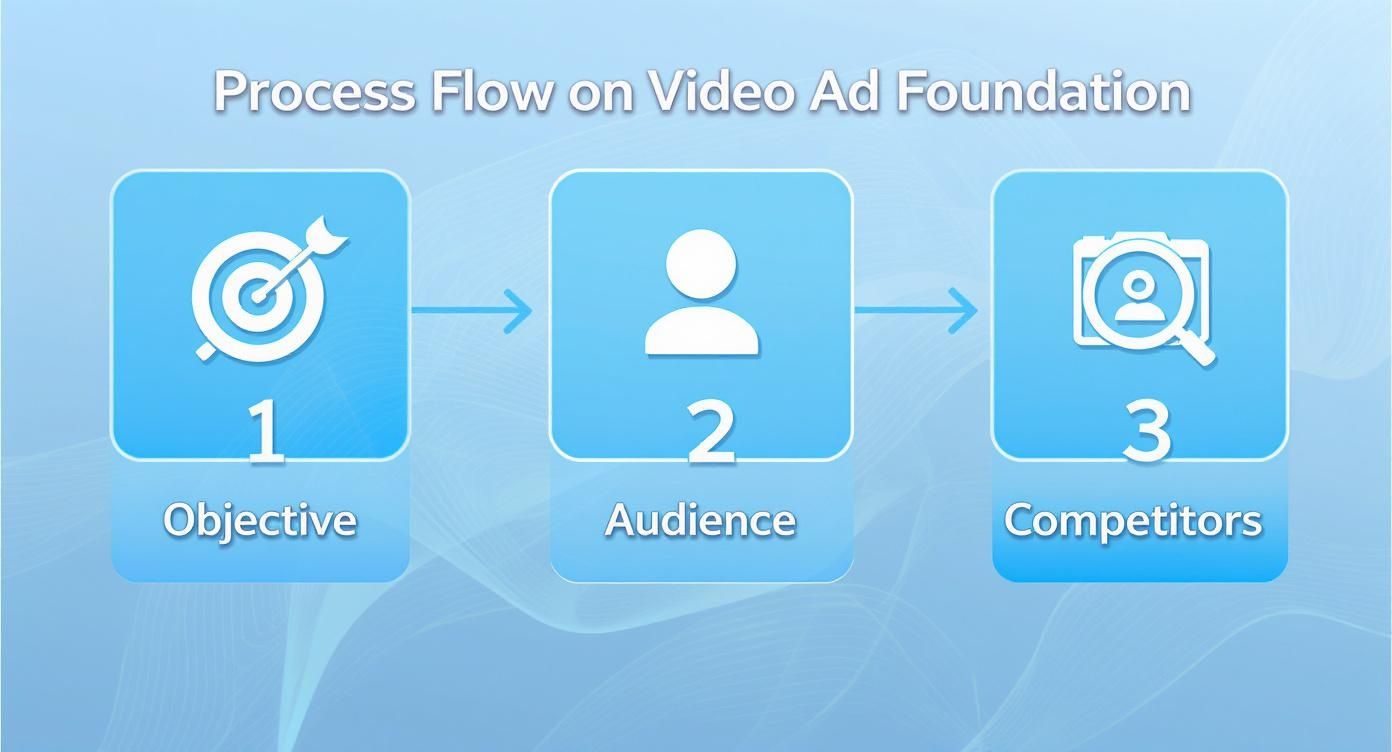
As you can see, a clear objective is the starting point. From there, you can define who you're talking to and how you can stand out from the crowd.
Profile Your Ideal Customer
You can't make a compelling ad if you don't know who you're talking to. And I mean really know them. Go way beyond basic demographics. Build a detailed profile of your ideal customer, including their biggest pain points, their secret desires, and their online hangouts.
If you need a hand with this, we have a complete guide on how to identify your target audience that breaks it down. Knowing these details is what helps you make smart decisions on everything from the ad's tone to its visual style.
Analyze the Competitive Landscape
Finally, it’s time to do some homework on your competitors. What kind of video ads are they running? Which ones seem to be getting all the love and engagement? You're not looking to copy them—you're looking for gaps and opportunities they've missed.
As you're laying this groundwork, another key decision is weighing the pros and cons of live video or pre-recorded content. This choice can dramatically change your production workflow and how your audience interacts with your ad, so it’s worth thinking about early on.
Crafting a Script That Stops the Scroll
A great ad tells a story, it doesn't just scream a sales pitch. Your script is the blueprint for that story, setting the pace, the tone, and ultimately, whether or not your ad actually works. It all starts with those first three seconds—the make-or-break window where people decide to watch or just keep on scrolling.
That initial moment is your entire pitch, boiled down to its most potent form. If you don't instantly break their scrolling pattern with a sharp question, a surprising statement, or a super-relatable problem, the rest of your ad might as well be invisible. Understanding how to use powerful viral hooks is non-negotiable here. Don't bury the good stuff—put your most compelling point right at the start.
Building a Narrative That Connects
Once you've snagged their attention, you need a simple framework to guide them from "problem" to "your solution." For short-form video, one of the most reliable storytelling models is Problem-Agitate-Solve (PAS).
It's dead simple and shockingly effective:
- Problem: Hit them with the pain point they know all too well. "Tired of spending hours designing social media posts?"
- Agitate: Now, twist the knife a little. Remind them why it's so frustrating. "It’s a huge time sink, and the results are often generic and uninspired."
- Solve: This is where you ride in on your white horse. "What if you could generate a week's worth of viral content in minutes?"
This structure just works. It follows the natural flow of a conversation, showing you get their struggle before you ever ask for a dime. That builds trust and positions your product as the hero, not just another thing for sale.
From Script to Visual Storyboard
Getting the words right is only half the job. Now, you have to actually see them. That's where a storyboard comes in. It’s basically a comic strip version of your ad, mapping out each scene. Don’t worry, it doesn’t need to be a masterpiece—stick figures and basic shapes are all you need.
A storyboard is your insurance policy against a chaotic shoot. It ensures every shot has a purpose, aligns with your script, and contributes to the final story you’re trying to tell.
This visual plan forces you to think through things like camera angles, text on screen, and how you'll transition between scenes before you start recording. Trust me, it helps you spot problems early and saves a ton of headaches during production and editing.
The whole point is to translate your script into a clear visual sequence. For every key line, sketch out a corresponding frame. What will the viewer see when they hear those words? For a masterclass in how this looks in practice, checking out a detailed advertising script example can give you a solid foundation. When you plan both the words and the visuals together, you create a seamless, compelling story that’s far more likely to stop the scroll and get that click.
Sourcing and Producing Your Ad Visuals
Alright, you've got a killer script and a storyboard that maps out your vision. Now for the fun part: bringing it all to life. This is where you actually get the footage for your ad, and thankfully, you don't need a Hollywood budget to make something that truly connects and converts.
The options for getting visuals have exploded. You can shoot it yourself, pull from high-quality stock libraries, lean into the authenticity of user-generated content (UGC), or even generate entire scenes with AI. What's right for you? It all comes down to your brand, your message, and your resources.
There's a reason video ads have become such a cornerstone of marketing—they just work. The numbers back it up, with global spending projected to hit a mind-boggling $214.76 billion. In the U.S. alone, that figure is expected to reach $72 billion. You can dig into more of these video advertising trends yourself, but the takeaway is clear: getting your visuals right is non-negotiable.
The Rise of AI in Video Ad Creation
One of the biggest game-changers in recent years has been the arrival of powerful AI tools. Platforms like our own ViewPrinter are making it possible for literally anyone to produce professional-looking video ads without ever touching complex editing software. These tools can create dynamic scenes, generate lifelike avatars, and stitch clips together into a story that flows.
For instance, you could take a simple product photo, and an AI tool can whip up a short, animated video placing that product in a lifestyle scene. This completely levels the playing field, allowing small businesses and solopreneurs to pump out high volumes of creative content and compete with the big guys.
AI video generation isn't just a cost-saver; it’s a speed and iteration machine. You can test a dozen different visual concepts in the time it used to take to plan a single traditional video shoot. That’s a massive advantage when it comes to optimization.
The Raw Power of UGC
Another incredibly potent strategy is using User-Generated Content (UGC). We're talking about videos made by real customers, not polished actors. There's an undeniable authenticity to UGC that polished, branded content just can't replicate.
When a potential customer sees someone just like them genuinely raving about a product, it builds instant social proof and trust.
Finding UGC can be as simple as reaching out to happy customers, running a social media contest, or collaborating with micro-influencers who genuinely love what you do. The raw, unscripted feel of UGC is its greatest asset, making it a perfect fit for platforms like TikTok and Instagram where authenticity is king.
Making the Right Choice for Your Brand
So, how do you decide which path to take? There’s no single "best" method. In fact, the most effective ads often blend different approaches. You might use a flashy AI-generated scene for the first 3 seconds to hook viewers, then cut to authentic UGC for the main body, and close with a professionally shot product demo.
Here's a breakdown to help you decide on the right visual sourcing strategy.
Footage Sourcing Options Comparison
Trying to figure out where to get your video clips? Each method has its own strengths and weaknesses. This table breaks down the most common options to help you choose the best fit for your campaign's goals and budget.
| Method | Pros | Cons | Best For | | :--- | :--- | :--- | :--- | | AI Generation | Extremely fast, scalable, cost-effective, great for A/B testing multiple concepts. | Can sometimes lack human nuance or look generic if not guided well. | Rapidly testing hooks, creating animated product visuals, and scaling creative output on a budget. | | User-Generated Content (UGC) | Highly authentic, builds social proof and trust, often inexpensive to source. | Low production quality, less brand control, can be hard to find consistently. | Building community, creating relatable ads for social media, and showcasing genuine customer experiences. | | In-House Production | Complete creative control, highest potential quality, perfectly aligns with brand identity. | Expensive, time-consuming, requires specialized skills and equipment. | Hero campaigns, high-end product showcases, and telling a very specific brand story. | | Stock Footage | Quick and affordable, high production value, wide variety of generic shots available. | Can look impersonal, risk of using the same clips as competitors. | Filling B-roll gaps, establishing shots (like a city skyline), or visualizing abstract concepts. |
Ultimately, the goal is to pick a visual style that tells your story effectively and, most importantly, resonates with the people you’re trying to reach. Don't be afraid to mix and match to find what works.
Editing and Optimizing for Every Platform

The editing room is where the magic really happens. This is the moment all your hard work—the script, the footage, the big idea—gets stitched together into an ad that can actually persuade someone. It’s where you set the rhythm that will either hook viewers instantly or send them scrolling right past you.
Think of post-production as more than just assembly. It's strategic optimization.
Every single cut, transition, and sound effect needs to serve one purpose: keeping the viewer glued to the screen. Quick, punchy cuts can build a ton of energy, which is perfect for a product reveal. On the other hand, slower, more deliberate pacing might be better if you’re telling a more emotional story. It's all about matching the editing style to your goal and the platform's vibe.
Tailor Your Ad for Each Platform
I see this mistake all the time: running the same exact video file on every single platform. A one-size-fits-all approach is just a surefire way to burn through your ad budget with nothing to show for it. An ad that crushes it on YouTube will almost certainly flop on TikTok, and vice versa.
Each platform has its own unwritten rules, user expectations, and—most critically—technical specs. You absolutely have to format your video for the environment it's going to live in. This part is non-negotiable.
- TikTok & Instagram Reels (9:16): This is the full-screen vertical experience. Your ad needs to be visually interesting from top to bottom, with all the important stuff centered so it doesn't get covered by the app's interface.
- Instagram & Facebook Feed (1:1 or 4:5): A square or slightly vertical format is your best bet here. It commands a solid chunk of screen real estate in the main feed without making people turn their phones.
- YouTube (16:9): The classic widescreen format is still king on YouTube. This is where you can get a bit more cinematic with longer stories, since people are already there to watch that kind of content.
Design for Silent Viewing First
Here's a hard truth about modern video ads: most people will never hear them. It's wild, but over 75% of all video views happen on mobile, and a staggering 85% of those mobile videos are watched without sound. For a deeper dive, you can explore more mobile video statistics.
What does this mean for you? Your ad must get its entire message across visually.
Captions and on-screen text are no longer just an accessibility feature—they are a core part of your creative strategy. Use big, bold text to call out key benefits, your main offer, and especially your call-to-action.
Your ad’s story should be perfectly clear with the sound off. If a viewer has to turn on the audio to understand what you’re selling, you’ve already lost them.
Finally, don't forget your branding. Weave it in subtly but clearly. Stick your logo in a corner or use your brand's color palette for text overlays and graphics. The goal is to build brand recognition without screaming "I'm an ad!" in your viewer's face. Nailing these details is a huge part of effective video editing for social media, turning a good idea into an ad that actually performs.
Testing and Scaling Your Video Ad Campaigns
So, you’ve launched your video ad. Job done, right? Not even close. Hitting "publish" isn't the finish line; it’s the starting gun. The real work—and the real profit—comes from what you do next.
This is where you stop guessing and start knowing. You need to test, read the data, and make smart moves to scale what’s actually working. This transforms ad creation from a one-shot effort into a rinse-and-repeat cycle of constant improvement.
Building Your A/B Testing Framework
The biggest mistake I see people make is testing way too much at once. If you change the hook, the CTA, and the visuals in a new version, you have absolutely no idea which change actually moved the needle. You’re just throwing spaghetti at the wall.
The key is to isolate one variable at a time. This gives you clean, undeniable data on what works.
Start with the elements that pack the biggest punch. Here's a simple, high-impact priority list for your first tests:
- The Hook (First 3 Seconds): This is your highest-leverage test, period. Pit two totally different opening lines or visuals against each other. This is what stops the scroll, so get it right.
- The Call-to-Action (CTA): Test a hard-sell CTA like "Shop Now" against a softer approach like "Learn More." You’d be shocked how often the less aggressive CTA wins by driving more qualified clicks.
- The Thumbnail: Before a single frame plays, the thumbnail is doing the heavy lifting. Try a clean product shot versus a thumbnail with a human face. It’s your ad’s first impression.
Once you find a clear winner for your hook or CTA, then you can move on to testing the smaller stuff like background music, caption styles, or different b-roll footage.
Interpreting Key Metrics for Smart Decisions
Don't get lost in a sea of data. You only need to obsess over a few key metrics to understand what your ad is telling you. Click-Through Rate (CTR) shows how compelling your creative is, while Cost Per Acquisition (CPA) tells you if you're actually making money.
Don't get distracted by vanity metrics. A video with thousands of views but a CPA that makes your eyes water is a failing ad. Always, always focus on the numbers tied directly to your business goals.
Is your CTR in the gutter? Your hook or thumbnail isn't doing its job.
Is your CTR great but your CPA is sky-high? The ad worked, but something is broken on the other side—your landing page, your offer, or your price.
This is how you diagnose problems like a pro. It lets you confidently kill the ads that are burning cash and pour your budget into the winners that are actually delivering results.
Your Top Video Ad Questions, Answered
Jumping into video ads can feel like a minefield of questions. Let's clear up some of the most common hurdles marketers face so you can move forward with total clarity.
How Long Should My Social Media Video Ad Be?
Honestly, it all comes down to the platform. Think about user behavior. On TikTok and Instagram Reels, you're fighting for attention in a fast-scrolling world. Keep it short and punchy—15-30 seconds is your sweet spot. The goal is to make an immediate impact.
Now, if you're running ads on YouTube or Facebook, you have a little more breathing room. Viewers are often more leaned-in, so you can push it to 60 seconds. But here's the non-negotiable rule: your core message and call-to-action absolutely must land within the first 5-10 seconds. That's when most people decide to stick around or scroll on.
No matter the total length, your ad's success is determined in the first few seconds. If you haven't given viewers a reason to care by then, the rest of your video doesn't matter.
What Are the Most Important Parts of a High-Converting Video Ad?
I've seen thousands of ads, and the ones that consistently convert always nail three key things:
- A Killer Hook: You have less than three seconds to stop the scroll. Seriously. Hit them with a provocative question, a bold claim, or a super relatable problem right out of the gate.
- Crystal-Clear Messaging: Don't get fancy. Directly address a pain point and position your product as the obvious solution. Any hint of confusion will tank your conversions.
- An Unmissable Call-to-Action (CTA): Tell people exactly what you want them to do. "Shop Now," "Learn More," "Sign Up"—be specific, be direct, and make it ridiculously easy for them to follow through.
Of course, high-quality visuals and crisp audio (or big, bold captions for silent watchers) are the foundation. They build the trust needed for the other elements to actually work.
How Much Does It Really Cost to Create a Video Ad?
This is the "how long is a piece of string?" question. The budget can range from virtually nothing to the cost of a new car. You can absolutely get started with just your smartphone and an affordable editing app.
If you want to level up a bit, using AI video tools or high-quality stock footage can land you in the $50 to $500 range. Thinking about hiring a freelancer? That could be anywhere from $500 to $5,000. And if you go with a full-blown agency production, you're easily looking at $10,000+.
The smartest way to go? Start small, see what resonates with your audience, and then reinvest your budget into what's already proven to work.
Ready to create high-performing video ads in minutes, not days? ViewPrinter gives you the AI-powered tools to generate visuals, craft compelling stories, and automate your entire social media workflow. Start creating with ViewPrinter today and see the difference for yourself.