
Social Media Content Planning Template: Streamline Tasks
A practical social media content planning template to streamline your workflow. Learn actionable tips to organize and publish content efficiently.
Just winging it on social media is a surefire way to get lost in the noise. In today's crowded feeds, the line between random posts and real impact is drawn with a solid plan. A good social media content planning template is what turns the chaos of content creation into a focused, results-driven engine for your brand.
Why Modern Social Media Demands a Smarter Plan
The days of posting a couple of times a week whenever inspiration strikes are long gone. The sheer volume of content you need just to stay on people's radar has skyrocketed. Now, brands have to figure out how to be everywhere all the time without letting their quality slip.
And that pressure isn't letting up. Research suggests that by 2025, some brands might need to push out between 48 and 72 posts per week across all their platforms just to maintain visibility. That’s a staggering number. According to the same report from Hootsuite, brands that consistently get creative with their content are 2.3 times more likely to see a positive business impact.
From Chaos to Cohesion
Without a plan, your social media feels like a constant, last-minute scramble. You forget about important dates, your messaging gets all over the place, and you miss golden opportunities to connect with your audience. A content planning template is your command center—it brings order to that chaos.
A central plan gives everyone on your team a single source of truth to work from. It helps you nail a few crucial things:
- Stay Consistent: Every post, from the visuals to the tone of the caption, feels like it’s coming from the same brand.
- Save Your Sanity (and Time): When you batch-create and schedule content in advance, you free yourself up to actually engage with your audience instead of just feeding the content machine.
- Align with Your Goals: You can map out your content around big moments like product launches, sales, or holidays to make sure they land with maximum impact.
A well-built template is more than just a calendar. It's the blueprint for a cohesive social media presence that consistently gets you closer to your goals. It transforms content from a reactive chore into a proactive strategy.
To help you get there, we've put together a downloadable social media content planning template designed to tackle these exact challenges. It's a combination of a calendar, a content brief, and a pre-publishing checklist to help you plan, create, and post with confidence. It's the tool you need to stop just posting and start building something powerful.
Key Components of an Effective Planning Template
Our downloadable template isn't just a blank calendar. We've built it with specific sections, each designed to streamline a different part of your workflow. Here's a quick look at what's inside and why each piece matters.
| Component | Purpose | Key Benefit | | :--- | :--- | :--- | | Monthly Calendar View | Provides a high-level overview of your posting schedule, including key dates and campaign timelines. | Quickly spot content gaps and ensure a balanced mix of post types across the month. | | Weekly Content Plan | Details the specific content for each day, including platform, format, and primary goal (e.g., engagement, traffic). | Allows for granular planning and ensures daily activities align with weekly strategic goals. | | Content Brief Section | A dedicated space to outline the specifics of each post: the core message, CTA, required assets, and caption drafts. | Keeps your creative team aligned and ensures every post is purposeful and on-brand. | | Pre-Publishing Checklist | A simple checklist to run through before a post goes live, covering things like link checks, tagging, and alt text. | Prevents common mistakes and ensures every post is polished and optimized for performance. | | Performance Tracker | A section to log key metrics (likes, comments, shares, clicks) for each post after it goes live. | Makes it easy to see what’s working and what isn’t, allowing you to refine your strategy over time. |
By using these components together, you move from simply scheduling posts to building a full-fledged content strategy that you can execute consistently and measure effectively.
Making the Template Your Own

A generic plan will always lead to generic results. The real magic happens when you take our social media planning template and shape it to fit your brand's unique personality and goals. This isn't just about filling in boxes—it's about creating a strategic command center built for you.
Your first move? Define your core content pillars. These are the 3-5 foundational themes your content will always come back to. Think of them like the main channels on a TV network; they tell your audience exactly what to expect when they tune in.
For example, if you’re an e-commerce brand selling sustainable activewear, your pillars might look something like this:
- Eco-Friendly Materials: Posts that show off the sourcing and benefits of your recycled fabrics.
- Workout Inspiration: User-generated content, fitness tips from your community, and motivational quotes.
- Behind the Brand: Stories about your team, your mission, and a peek into your manufacturing process.
Speaking Your Audience's Language
Once your pillars are set, it’s time to get crystal clear on who you're talking to. Our template has a section for audience personas. Don't just gloss over it. Knowing your ideal customer—their goals, what keeps them up at night, and where they hang out online—is what separates a good caption from a great one.
This is where your brand voice really comes to life. Are you witty and a little sarcastic, or are you more authoritative and educational? A huge part of customizing your template is ensuring your message helps you build brand awareness and actually connects with people.
Documenting your voice—key phrases, your go-to emojis, and a clear do-and-don't list—is crucial for consistency. It’s a lifesaver whether you’re a solo creator or part of a bigger team. For a complete walkthrough on this, check out our guide to creating social media brand guidelines.
Pro Tip: Color-code your content pillars right in the calendar. Assign a unique color to each theme (e.g., green for sustainability, blue for product features). This gives you an instant visual of your content mix, making it easy to see if you're leaning too heavily on one topic.
Fine-Tuning Your Workflow
Finally, adapt the calendar's structure to how you actually work. The template is flexible enough for weekly, monthly, or even quarterly planning cycles.
If your brand is nimble and loves to jump on trends, a weekly or bi-weekly rhythm might be your sweet spot. But for larger campaigns tied to product launches or seasonal events, mapping out a full quarter gives you that high-level view you need to stay on track.
Don't be afraid to change things up. Adjust the columns, add rows for platform-specific notes, or even integrate a section for tracking influencer collaborations. The whole point is to create a living document that makes strategic social media management feel less like a chore and more like one of your biggest business advantages. This is the step that turns a simple template into a powerful content engine.
Bringing Your Content Calendar to Life
Staring at a blank calendar can feel a little daunting, I get it. But this is where the magic happens. We’re about to turn that empty grid into a living, breathing plan that actually works. Moving from a template to a full schedule is all about having a system to get your ideas down and organized.
First things first, let's brainstorm. But not just random ideas. You need to think within the guardrails of your content pillars. This isn't about chasing the latest trend; it's about creating posts that hammer home what your brand is all about. For each pillar, just start a running list of potential topics, formats, and messages.
For example, if you're a consultant focused on personal branding, your thought process might look like this:
- Pillar: "Expertise" — What are the top five questions clients always ask me? That’s a perfect carousel post.
- Pillar: "Behind the Scenes" — What does my morning routine look like for peak productivity? That's an easy win for an Instagram Story.
- Pillar: "Client Success" — Can I share a sanitized case study from a recent win? Great, that’ll be a LinkedIn article.
Mapping Out Your Content Mix
A killer content calendar doesn't just have good ideas; it has a good mix of formats. If all you post are static images or long videos, people will get bored and tune out. Your social media content planning template needs to reflect a healthy variety.
Different formats do different jobs. Reels are phenomenal for grabbing attention and reaching new people. Carousels are my go-to for teaching something or telling a deeper story. And Stories? They create that raw, personal connection that builds a real community. If you need a powerful way to visualize this mix, a good Editorial Calendar template can be a lifesaver.
A great content plan doesn't just schedule posts; it orchestrates a conversation. By varying your content formats, you cater to different audience preferences and keep your feed feeling fresh and dynamic.
Next, start layering in the big stuff—key industry dates, holidays, and your own company milestones. Is there a national awareness day that fits your niche? Got a product launch or a company anniversary coming up? Drop these "tentpole" events onto your calendar first. They act as anchors that you can build the rest of your content around.
Using the Content Brief for Purposeful Posts
This is where your strategy gets real. The content brief built into the template is there for a reason: it forces you to think through the why of every single post before you waste a second creating it.
For every post you add to the calendar, take a minute to fill out:
- Objective: What’s the number one thing this post needs to do? (e.g., drive traffic to a blog post, get sign-ups, boost engagement).
- Key Message: If they only remember one thing, what is it?
- Call-to-Action (CTA): What, exactly, do you want them to do next? (e.g., "Comment below," "Tap the link in bio," "Save this for later").
This might feel a little tedious at first, but it’s the secret to making sure every piece of content you create actually has a point. The sheer scale of social media today demands it. By 2025, there will be an estimated 5.42 billion social media users across the globe, with the average person hopping between nearly seven different platforms each month. To cut through that noise, every post needs a purpose. You can see just how fragmented audiences are in the latest social media statistics report.
Streamlining Your Content Workflow and Execution
A plan is just a document until you execute. This is where your social media content planning template comes to life, turning from a static spreadsheet into a content-producing machine. The real secret is moving from a frantic, post-by-post scramble to a reliable system that actually saves you time and dramatically improves your quality.
The single biggest change you can make? Batch-create your content. Seriously. Instead of trying to film one Reel on Monday, then designing a carousel on Wednesday, block out a dedicated chunk of time to produce a week's—or even a month's—worth of assets all at once. This one move eliminates the constant mental whiplash of task-switching, which studies show can devour up to 40% of your productive time.
This simple flow is how you turn your ideas into actual posts.
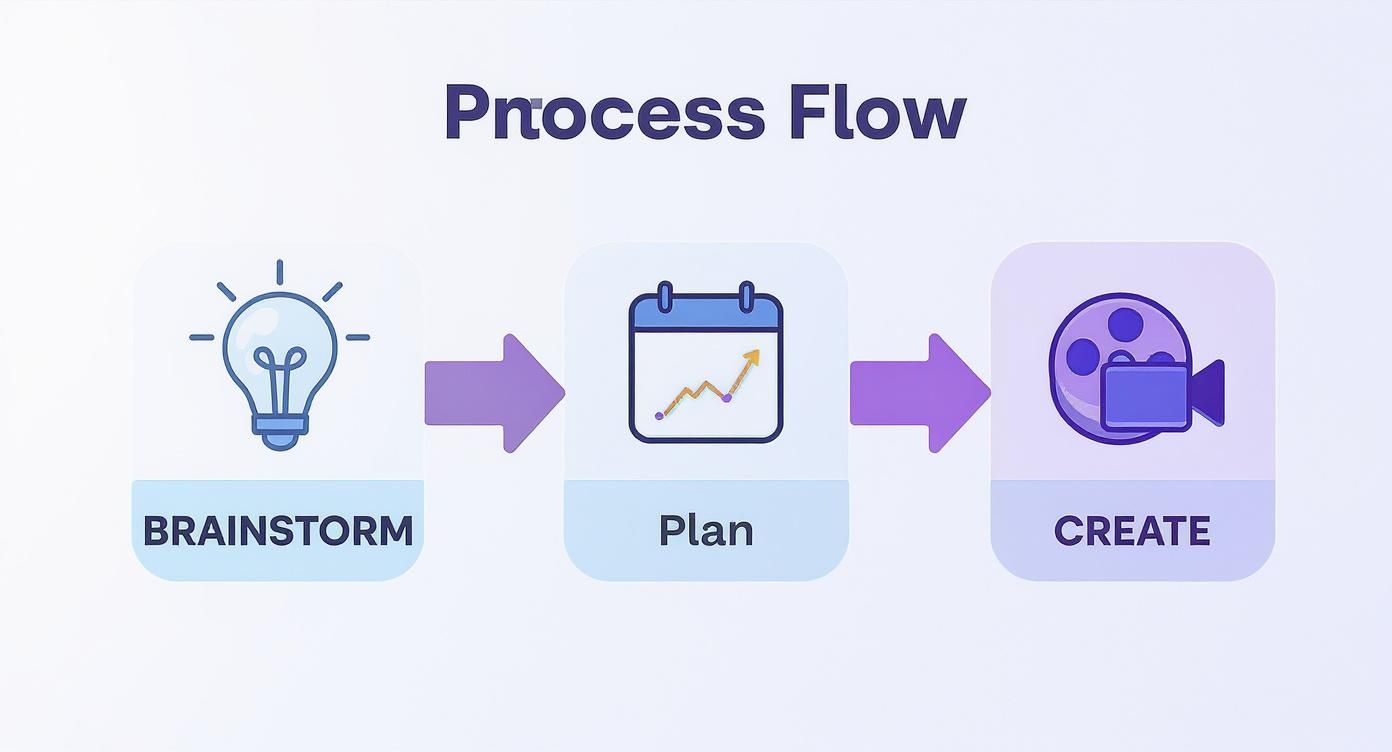
It’s a straightforward loop: brainstorming feeds the plan, the plan guides creation, and the results of your creation spark new ideas.
From Creation to Automation
Once you have a bank of content, you can start working smarter, not harder. Did a carousel post explaining a core concept get a ton of saves? Great. That's your green light to turn those slides into a script for a short video. That video can then be chopped up into a few engaging Stories. This isn’t about being lazy; it’s about squeezing every drop of value from your winning ideas.
With your assets ready to go, automation is the final piece of the puzzle. Using a scheduling tool is non-negotiable for anyone serious about social media. Platforms like ViewPrinter let you schedule everything for the perfect time, freeing you from the daily pressure of hitting "publish." You can use that reclaimed time for what actually moves the needle: engaging with your community in real-time. For a deeper look at this process, check out our complete guide to building an efficient social media content workflow.
The goal isn't just to fill the calendar. It’s to build a system where high-quality content production becomes predictable, repeatable, and less dependent on last-minute creative sparks.
The Pre-Flight Checklist
If you’re working with a team, a quick approval process is essential. Before anything goes live, have a second pair of eyes check the post against the content brief in your template. This simple step is your best defense against typos, ensures the brand voice is on point, and confirms the post actually aligns with its strategic goal.
Our template comes with a pre-flight checklist for this very reason. Think of it as your final quality check to make sure every post is set up for success:
- Hashtags & Keywords: Are they relevant and did you actually research them?
- Tags & Mentions: Are all partners, creators, or locations tagged correctly? No typos?
- Link Check: Does the URL in the bio or caption actually work? (You'd be surprised how often it doesn't.)
- Accessibility: Is there descriptive alt text on the images? Are the video captions clear and accurate?
Running through this list takes maybe two minutes, but it can save you from an embarrassing mistake and ensure every single post has the best possible shot at hitting its mark.
Using Data to Refine Your Content Strategy
A perfectly planned calendar is a great start, but let's be real—the real growth happens when you start listening to your audience. And they tell you what they love (and what they don't) with their actions.
Your social media template shouldn’t just be a scheduler you set and forget. Think of it as a living document that gets smarter every time you feed it performance data. This is how you stop guessing what to post and start making data-backed decisions that actually move the needle.
Our template has a built-in metrics tracker to make this painless. A few days after a post goes live, just pop in and log its key performance indicators (KPIs). Don't let the acronym scare you; these are just simple numbers that tell the story of how well your content landed.
Focusing on the Metrics That Matter
To get started without getting overwhelmed, focus on a few core metrics that tie directly back to your goals. You can usually find these right inside the native analytics of each social media platform.
- Engagement Rate: This is the big one. It’s the percentage of your audience that actually interacted with your post—likes, comments, shares, saves. A high engagement rate is a powerful sign that your content truly resonates.
- Reach/Impressions: Reach tells you how many unique people saw your post, while impressions are the total number of times it was seen. If a post gets high reach, it means the algorithm liked it enough to show it to a wider audience. Win.
- Click-Through Rate (CTR): Posting a link? This metric shows you how many people actually bothered to click it. It’s essential for measuring how well your content drives traffic off the platform.
Pulling these numbers together starts to paint a clear picture of what's working. For an even deeper dive, you can set up a dedicated social media analytics dashboard to track trends over the long haul.
Turning Insights Into Action
Data is completely useless if you don't act on it. Set aside just 30 minutes at the end of each month to review your tracker.
Sort your posts by engagement rate or reach. This will instantly show you your top performers. Now, ask yourself: what do these winners have in common?
The whole point of a monthly review is simple: do more of what works and less of what doesn't. This feedback loop is what separates accounts that stay flat from those that see explosive growth.
Maybe you’ll discover your audience absolutely loves your behind-the-scenes Reels but scrolls right past your text-only posts. Or perhaps those detailed carousel guides get the most saves. Boom—that's your roadmap for next month's content plan.
It also helps to understand the benchmarks for each platform. For example, recent data for 2025 shows LinkedIn leading with an average engagement rate of 6.50%, while Instagram's is closer to 1.16%. Knowing this helps you set realistic goals and not get discouraged. The same report from Dreamgrow.com also notes that 49% of marketers feel they don’t repurpose content enough—something a data-informed template makes way easier.
This data-driven approach, powered by your content planner, ensures your efforts get smarter and more effective with every single post.
Common Questions About Your Content Plan
Even with a killer template, you're going to have questions. That's normal. Digging into the details is what separates a decent content strategy from one that actually gets results. Let's walk through some of the most common hurdles I see people face.
How Far in Advance Should I Plan My Content?
Getting the timing right is a constant balancing act. For most businesses, planning your day-to-day content about one month in advance is the sweet spot. This gives your team plenty of breathing room for creating great work and getting approvals, but it’s not so rigid that you can’t jump on a trend.
The big exception? Major campaigns or product launches. For those, you need to be thinking on a quarterly timeline. That longer runway is crucial for lining up all your marketing efforts, not just social.
The real key here is building in some wiggle room. I always tell my clients to leave about 20% of their calendar open. Think of this as your "opportunity fund" for timely, spontaneous, or trending content you just can't predict. It’s all about having a proactive plan that can still be reactive when it counts.
How Do I Pick the Right Content Pillars?
Staring at a blank page trying to choose content pillars can feel paralyzing. Don't overthink it. Your pillars should simply be a reflection of what you know best and, more importantly, what your audience actually needs help with.
A simple but powerful mix often includes pillars to educate (how-tos, tips), entertain (behind-the-scenes), inspire (success stories), and promote (product features, offers). This ensures you're not just selling all the time; you're building a genuine connection.
A great rule of thumb is the 80/20 principle. Aim for 80% of your content to be pure value—stuff that helps, entertains, or inspires. The other 20% can be for direct promotion. When you follow this, people will trust you, and your promotional posts will hit so much harder.
How Do I Find Enough Ideas to Fill the Calendar?
The fear of the blank calendar is real, but it doesn't have to be. The best ideas aren't pulled out of thin air; they come from systems.
Start by listening. Seriously. What questions are people asking in your DMs, comments, or customer service emails? Those are content gold.
Next, get a little help from some tools. A service like AnswerThePublic shows you exactly what people are searching for around your topics. It's also smart to keep an eye on your competitors to see what they're missing—that's your opening.
But your most powerful tool is your own data. Dive into your analytics. Your best-performing posts are a literal roadmap showing you what your audience loves. Use the "Idea Bank" in the template to jot these down as soon as you find them.
One last thing—stop treating every platform the same. The copy-paste approach is a recipe for mediocrity. Yes, repurpose your core idea, but always adapt the execution. Your goal is to be platform-native, not just platform-present.
A single concept can be a polished carousel on LinkedIn, a quick-cut video for Reels, and a conversational thread on X. Our template has a spot for platform-specific notes for this very reason. Use it to tweak your captions, visuals, and hashtags to get the most out of every single post.
Ready to turn this content plan into a smooth, automated workflow? The ViewPrinter platform gives you all the AI-powered tools you need to create, schedule, and automate your social media content in one place. Stop guessing and start building a content machine that drives real results. Explore ViewPrinter today and see the difference a real system can make.