A Guide to AI Script to Video Creation
Turn your script to video with AI. This guide covers how to write optimized scripts, generate visuals, and edit your content for professional results.
Turning a script into a video used to be a massive headache. The whole process was slow, expensive, and really only accessible to people with professional studio gear. That's not the world we live in anymore.
Modern AI tools have completely flipped the script, letting you transform written text into slick, engaging social videos in minutes, not days. This guide is going to walk you through exactly how it all works.
The New Reality of Video Content Creation
The jump from clunky, manual video editing to an automated, AI-driven workflow is a game-changer for anyone creating content. What once took specialized skills and countless hours of tedious work can now be done with just a few clicks. This has blown the doors wide open for everyone from solo creators to entire marketing teams.
This whole new way of working is powered by a handful of core AI engines that talk to each other behind the scenes. Instead of you having to dig through stock footage libraries, record a voiceover, and then painstakingly sync everything up, the AI does all the heavy lifting. In this new reality, getting good at automating content creation for scale is a massive advantage.
The market numbers back this up, too. The text-to-video AI space is expected to rocket from USD 0.4 billion in 2025 to USD 1.18 billion by 2029. That’s a staggering growth rate of nearly 31% every single year. It's not a small trend; it's an explosion.
How AI Powers The Video Creation Workflow
At its core, the process is surprisingly simple. You feed an AI model your script, and it gets to work understanding the context, tone, and overall vibe. From there, it starts pulling together all the visual and audio pieces needed to bring your words to life.
A few key technologies make this magic happen:
- Natural Language Processing (NLP): This is how the AI "reads" your script. It figures out the main themes, important keywords, and even the emotional feel of the text.
- AI Avatar Generation: These aren't clunky robots. Sophisticated models create surprisingly lifelike digital presenters that can narrate your script with realistic expressions and movements.
- Automated Shot Selection: The AI can either pull from massive stock footage libraries or generate brand-new visuals, finding the perfect clips to match what's being said in each sentence.
This diagram gives you a clear picture of how a simple script gets turned into a finished video.
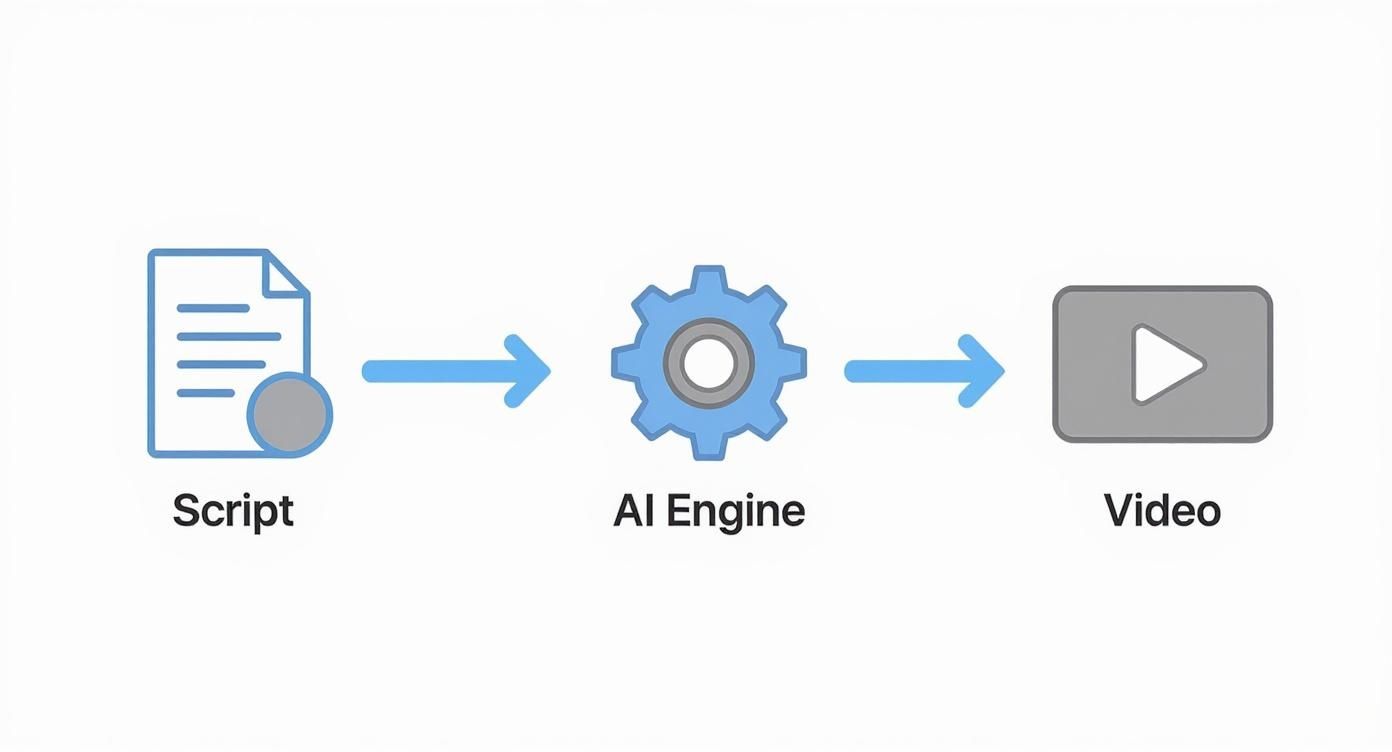
As you can see, a single text document kicks off a whole chain of automated events, making the entire process incredibly efficient.
Core AI Video Generation Technologies
To really get a handle on how this all works, it helps to break down the specific AI technologies that are doing the work. Each one has a distinct job in the assembly line.
| AI Technology | Function in Script-to-Video | Primary Benefit | | ----------------------------- | ------------------------------------------------------------- | ------------------------------------------------------------ | | Natural Language Processing (NLP) | Analyzes the script to understand context, keywords, and sentiment. | Ensures the video's visuals and tone match the text's meaning. | | Generative Adversarial Networks (GANs) | Creates realistic AI avatars, scenes, and synthetic media from text prompts. | Produces unique, high-quality visuals without stock footage. | | Text-to-Speech (TTS) | Converts the written script into a natural-sounding voiceover. | Eliminates the need for manual voice recording and equipment. | | Computer Vision | Scans stock video libraries to find clips that match the script's content. | Quickly sources relevant B-roll footage automatically. |
Together, these technologies form a powerful engine that takes your raw text and turns it into a polished video, ready for social media.
How to Write Scripts That AI Understands
The quality of your final video is directly tied to the quality of the script you feed the AI. Garbage in, garbage out. To really nail the script-to-video process, you have to stop thinking like a writer and start thinking like a director giving simple, clear instructions to a very literal assistant.
Forget long, dense paragraphs. AI video tools thrive on short, punchy sentences. Each new sentence—or even a very short paragraph—is often the trigger for a new visual scene. Writing this way not only forces you to be concise but also helps the AI pace your video in a way that feels natural to the viewer.
As a bonus, this approach makes your script super scannable and easy to review before you generate anything. If you want to see how this plays out in a real-world context, this guide on crafting an advertisement script example is a great place to start.
Structuring for Visual Flow
Think visually from the very beginning. Instead of just writing down what you want to say, include simple, descriptive cues for the AI to follow. You don't need to get bogged down in complicated screenwriting jargon.
Just embed these cues directly into your script to guide the AI’s visual choices. This simple act of pre-directing transforms your text from a basic transcript into a powerful production blueprint.
- Scene Descriptions: Use brackets to paint a picture. For example:
[Close-up on a laptop screen showing code] - Tonal Shifts: Set the mood for a scene. For example:
[Upbeat and energetic music starts] - Pacing Notes: Tell the AI how fast things should move. For example:
[Fast-paced montage of city life]
This method gives you way more control over the final cut, making sure the visuals and your narrative are perfectly in sync.
Pacing and Ideal Script Length
Script length is everything. One of the most common mistakes I see is people writing way too much. The result? A video that drags on and loses the audience's attention almost immediately.
A solid rule of thumb is to aim for a speaking rate of about 150 words per minute. This means a script of around 150 words is perfect for a punchy, 60-second social media clip—often the sweet spot for engagement. If you’re building a more detailed explainer video, a 450-word script will get you roughly three minutes of content.
Key Takeaway: Write for the ear, not the eye. Before you even think about handing your script to the AI, read it out loud. If a sentence is a struggle to say in one breath or just sounds clunky, rewrite it. This one simple test is the secret to making your AI voiceover sound conversational and authentic, not like a robot.
Turning Your Words Into Visuals with AI
You’ve got a polished script. Now for the fun part: making it move. This is where we take the words on the page and turn them into a living, breathing video. Think of it as shifting from architect to builder, and AI is your high-tech construction crew.
This isn’t about just clicking "generate" and hoping for the best. It's about making smart choices that steer the AI toward creating something that feels like you. And your first big decision is who—or what—will be the face of your video.
Choosing Your Digital Presenter
Your avatar is the first thing your audience will connect with, so this choice matters. Platforms like ViewPrinter give you a ton of options, but they boil down to two main paths.
-
Stock Avatars: These are ready-to-go digital presenters. They’re fantastic for speed. If you need to crank out content quickly, test a new concept, or work on a project where a consistent brand face isn't critical, stock avatars are your best friend.
-
Custom Avatars: This is where you create a unique digital persona that’s exclusive to your brand. It’s the way to go if you're building a recognizable presence. Over time, that custom avatar becomes a familiar face your audience trusts.
Honestly, if you're playing the long game with your brand, a custom avatar is a no-brainer. But for quick, tactical content, a high-quality stock avatar gets the job done without any fuss.
Directing the AI to Build Your Scenes
With your presenter locked in, it’s time to let the AI start building out the scenes based on your script. Modern tools don’t just grab random clips; they actually read your text to find relevant stock footage or generate brand-new visuals. But you can—and should—steer the process with simple instructions embedded right in your script.
This is where you put on your director’s hat. Instead of leaving the AI to guess what you mean, you give it explicit directions. Let’s say a line in your script talks about a huge jump in productivity.
Example Prompt:
Our team's productivity soared in the last quarter. [AI Prompt: Create a fast-paced montage of a collaborative team working in a modern office, ending on a shot of an upward-trending graph.] This led to unprecedented success.
See how that little instruction gives the AI crystal-clear direction? It ensures the visuals match the energy of your words. If you're looking for more ways to level up your creation process, checking out other top AI tools for content creators can open up a world of new possibilities.
Pro Tip: Be specific, but don't micromanage. Use descriptive words like "serene," "energetic," or "professional" to set the mood. Simple commands like "Use imagery of..." or "Show a close-up on..." are powerful ways to control the final look without overcomplicating things.
By actively guiding the AI, you make sure the automated workflow actually serves your creative vision. It’s this partnership between human direction and AI execution that turns a good script into a great video.
Adding the Human Touch to Your AI Video
So, the AI has handed you a pretty solid first draft. It’s impressive, but think of it as the starting block, not the finish line.
The real magic happens now, in the final, human-led refinements. This is where you inject the nuance, personality, and professional polish that an algorithm just can't replicate on its own.
Think of the AI's version as a well-organized pile of raw materials—scenes, clips, and sounds. Your job is to step in as the final editor, making sure every single element serves the story perfectly.
Fine-Tuning Your Video’s Rhythm
The first thing I always tackle is the timing and pacing. It's the heartbeat of the video.
Often, an AI-generated scene will linger just a second too long or cut away a fraction too soon. Your first pass should be all about fixing this rhythm. Watch the video through, listening closely to the narration. Does the visual switch exactly when the narrator brings up a new idea? If not, it’s time to trim or extend the clip.
These tiny adjustments have a massive impact. For example, you might spot an awkward half-second of silence between sentences in the AI voiceover. By snipping that pause out, you instantly create a more confident, engaging delivery that keeps your viewer locked in.
It’s the same with visuals. The AI might have picked a piece of stock footage that’s technically correct but emotionally flat. Don't be afraid to swap it out. If your script mentions "successful collaboration" but the AI chose a generic office shot, find a clip that shows a team actively engaging, smiling, and connecting. That subtle change adds a layer of authenticity that viewers feel.
This whole process is a lot like the manual editing you’d do with any video, including refining assets for projects like UGC content creation, where finding that perfect clip makes all the difference.
Enhancing Your Audio and Brand Identity
Let's be real: audio is half the video experience, and it's a huge opportunity for human improvement. The right background music can completely shift the emotional tone of your content.
- Pick a Mood: First, choose a track that actually matches your message. Is it supposed to be inspirational, serious, or fun?
- Mix the Levels: Make sure the music supports the narrator, not fights with them. A good rule of thumb is to set the music volume low enough that it’s felt more than it's heard.
- Check the Pacing: Does the tempo of the music complement the speed of the narration and the cuts? A fast-paced track over a slow, deliberate voiceover can feel jarring.
Key Insight: Most viewers won't notice great audio mixing, but everyone will notice bad mixing. A clear voiceover paired with subtle, supportive background music instantly makes your video feel more professional and trustworthy.
Finally, and this is non-negotiable, you need to stamp your brand on it. This reinforces who you are and builds recognition. Add your logo as a small, persistent watermark in one of the corners. Attach your branded intro and outro to the start and finish of the video.
These elements create a cohesive viewing experience and make your content instantly recognizable, no matter where it gets shared online. These are the final touches that truly complete the journey from script to screen.
Polishing Your Video for Social Media and Beyond
Your AI-generated video is looking sharp, but don't hit publish just yet. A few final touches are what separate a good video from a great one, especially in a mobile-first world.
Let's be real: most social videos are watched on mute. This makes clear, readable captions a non-negotiable part of your workflow. It’s no longer just an accessibility feature; it's a core component of engagement.
Thankfully, most AI video tools, including ViewPrinter, come with built-in auto-captioning. This is a massive time-saver, but always think of it as a first draft. You absolutely have to review the generated text for typos or weird timing issues. The goal is to make sure every word syncs up perfectly with the voiceover.

Formatting for Maximum Impact
Once your captions are accurate, it's time to style them. The default settings are rarely going to cut it on a small screen.
Here are a few pointers I always follow:
- Choose the Right Font: Stick with a clean, sans-serif font like Arial or Helvetica. They’re just easier to read on a phone.
- Get the Size Right: Make the text big enough to be easily readable but not so big that it covers up your awesome visuals.
- Boost the Contrast: High contrast is your best friend. Think white text with a black outline or a semi-transparent dark background. This makes your words pop, no matter what’s happening behind them.
This kind of attention to detail is what makes your video accessible and keeps people watching, even without sound. It's no surprise that the AI video generator market, valued between USD 534 million and 716 million in 2024, is booming. That number is projected to hit USD 2.56 billion by 2032, driven by the demand for content that’s quick to create and easy to consume.
Optimizing for Every Platform
With your captions looking good, the final technical step is getting the video file ready for each social platform. You can't just post the same file everywhere and expect it to work.
Different platforms have different rules for the best viewing experience:
- 9:16 (Vertical): This is your go-to for Instagram Reels, TikTok, and YouTube Shorts.
- 1:1 (Square): Still a solid choice for Instagram and Facebook feed posts.
- 16:9 (Horizontal): The classic widescreen format for standard YouTube videos or embedding on your website.
Most AI video editors make this super easy, letting you export your project in multiple formats with just a few clicks. And to give your video the best possible chance, you need to know how to create compelling thumbnail images that stop the scroll and get that click.
Final Step: Don't just post your video and hope for the best. Use a scheduling tool to publish it when your audience is actually online. Dig into your platform's analytics to find those peak activity times. This ensures your brand-new video gets the immediate engagement it needs to take off.
Common Questions About Script-to-Video AI
Whenever you're jumping into new tech, you're going to have questions. The whole world of script-to-video AI is no exception. People are naturally curious about everything from speed and quality to how it fits into their bigger content plan. Let's get into some of the most common questions I hear.
How Long Does It Really Take?
This is usually the first thing people ask. The AI generation part? It's lightning-fast. For a typical one or two-minute social media clip, you can have a solid first draft in just 5-15 minutes.
Honestly, the bulk of your time will be spent on two things: polishing your script before you feed it to the AI, and making those crucial human-touch edits afterward. Even so, when you compare that to traditional video production that can drag on for days, this new workflow can easily slash your production time by over 90%.
Can an AI Actually Understand My Script’s Tone?
It's a fair question. Can a machine really pick up on the emotional vibe of your script? The answer is... surprisingly well. Modern platforms have gotten really good at analyzing your word choice and sentence structure to figure out the intended mood. From there, it can make smart choices about music, pacing, and even an avatar's facial expressions.
You're not powerless here, either. You can give the AI a little nudge in the right direction by adding simple tonal cues right into your script. It's a simple trick that works wonders.
- Try adding
[upbeat and energetic]before a section you want to feel exciting. - Or use
[somber and reflective]to signal a more serious, thoughtful mood.
It's not going to be perfect every time, but it gives you a fantastic emotional starting point. You can then jump in during the final edit to fine-tune it and make sure it lands exactly how you want it to.
Is AI-Generated Video Good for SEO?
Absolutely. In fact, it can be a huge advantage. Search engines like Google are hungry for video content, and using AI lets you produce it consistently and at a scale that would be impossible otherwise. The key is to treat your video's metadata with the same care you'd give a blog post.
My Go-To SEO Tactic: Always optimize your video's title, description, and tags with keywords people are actually searching for. Then, host it on YouTube and embed it on your website with a full transcript right below it. That transcript is gold—it gives search engines a ton of text to crawl, directly connecting your video to relevant search queries.
What are the Common Mistakes to Avoid?
I see a couple of common pitfalls all the time. The single biggest mistake is starting with a weak, rambling script. If you don't give the AI a clear roadmap with visual cues, it's just going to get lost. Garbage in, garbage out.
The second mistake is hitting "publish" on the AI's first draft. Always, always budget time to review and make your own refinements. Check the captions for accuracy, tweak the pacing, and make sure the final video truly feels like your brand.
Ready to stop writing scripts that just sit there and start turning them into videos that get noticed? ViewPrinter gives you all the AI-powered tools you need to create, edit, and schedule high-impact social media content in a fraction of the time. Start creating with ViewPrinter today!